

Appearance
A full async workflow
Doppio can respond immediately to your request and send the rendered document later, once processing is complete. This is useful when rendering may take a few seconds and you do not want to block your application flow.
How does it work?
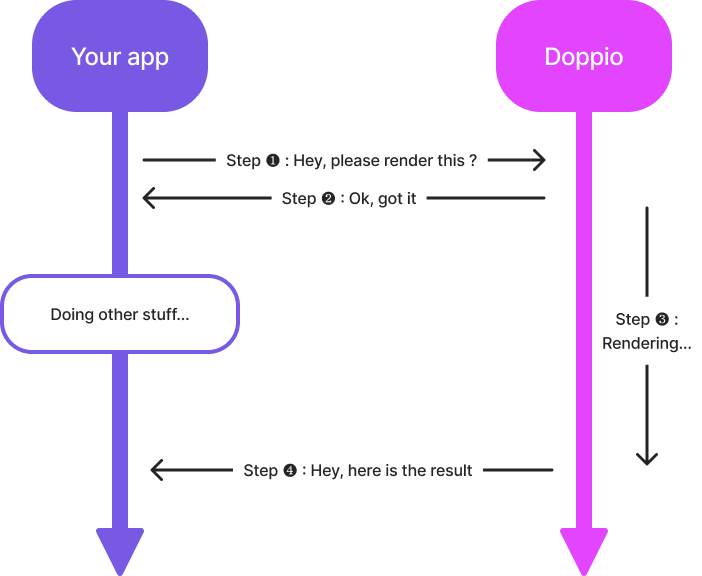
An async request works like this:
Step ❶: You call our API using an async route.
Step ❷: Doppio validates your request. If everything checks out (authorization, limits, and payload), it immediately returns a
200 OKresponse and adds your request to a queue. Otherwise, it returns the appropriate error code and message.Step ❸: Doppio renders your document while your app continues its own work.
Step ❹: Doppio calls the route you provided in the request payload, called a webhook, to send you the result of the render.
How do you use it?
- First, implement a route on your side to handle the webhook call. This route receives a payload with information about the render:
json
{
  "doppioRequestId": "3fa85f64-5717-4562-b3fc-2c963f66afa6", // Request ID used to link the webhook call to your async render request. The same ID is returned when you create the request.
  "renderStatus": "SUCCESS", // Render status. It can be "SUCCESS" or "ERROR".
  "documentUrl": "string", // URL where the document is hosted.
  "isAsync": true, // Indicates that this is an async request.
  "isCustomBucket": true // Indicates whether the document is stored in your own S3 bucket.
}
This route also receives specific headers:
- x-doppio-request-id: the same request ID as the one returned in the webhook payload and in the response to your original request.
- x-doppio-payload-signature: the request signature. Verify it to ensure the authenticity and integrity of the webhook. See here for more details.
- Then add your webhook configuration to the async request. It belongs under the
doppioproperty:
json
{
    "doppio": {
        "webhook": {
            "url": "<YOUR_WEBHOOK_HANDLER_URL>", // URL of the webhook handler
            "method": "POST", // HTTP method to use for the request, usually POST or PUT
            "headers": {} // Optional headers to add to the request
        }
    },
    "page": { ... }
    ...
}
WARNING
Choose a method that accepts a request payload, so not GET.
Unless you do not need the webhook payload, for example because the document is uploaded directly to your own bucket.
INFO
See here for more information about async parameters.
- Finally, handle the response body so you can associate the future webhook call with the original request.
json
{
    "requestId": "<YOUR_REQUEST_ID>", // Format doppioreq_<uuid>. Save it so you can match the later webhook call.
    "jobId": "<RENDERING_JOB_ID>" // Save it in case there is a problem.
}
Save the requestId somewhere so you can match the rendered document to the webhook call that follows. Also save the jobId just in case. If anything goes wrong, contact us with this jobId so we can investigate your request in our rendering and webhook queues.